What does airplane mode actually do?

 Let's look at what gets switched off inside the phone when you turn it on.
Airplane mode is a setting that switches off, all at once, the parts of a phone that communicate by sending out radio signals, such as the cellular connection and Wi-Fi. On planes, the basic idea is that electronic devices can be used as long as they are not sending signals, and airplane mode is the switch that puts a phone in that state. The detailed rules differ by airline and country, so please follow the crew's instructions.
Switching off signal-sending all at once
Airplane mode is a setting that turns off, all at once, the ways a phone or tablet communicates by sending out radio signals. According to Apple, airplane mode turns off the cellular connection and Wi-Fi during a flight. Apple says that on an iPhone it turns off all radios except Bluetooth.
Usable as long as it sends no signals
A Q&A from the European Union Aviation Safety Agency (EASA), which looks after air safety in Europe, says the devices that may be used on board are those that are not transmitting, which means they are in airplane mode. Connections such as the mobile phone network, Wi-Fi and Bluetooth should be switched off. A 2014 document from Japan's Ministry of Land, Infrastructure, Transport and Tourism also sorts phones this way: a phone in normal mode is a device that sends out radio signals, while a phone in airplane mode is a device that does not, like a digital camera.
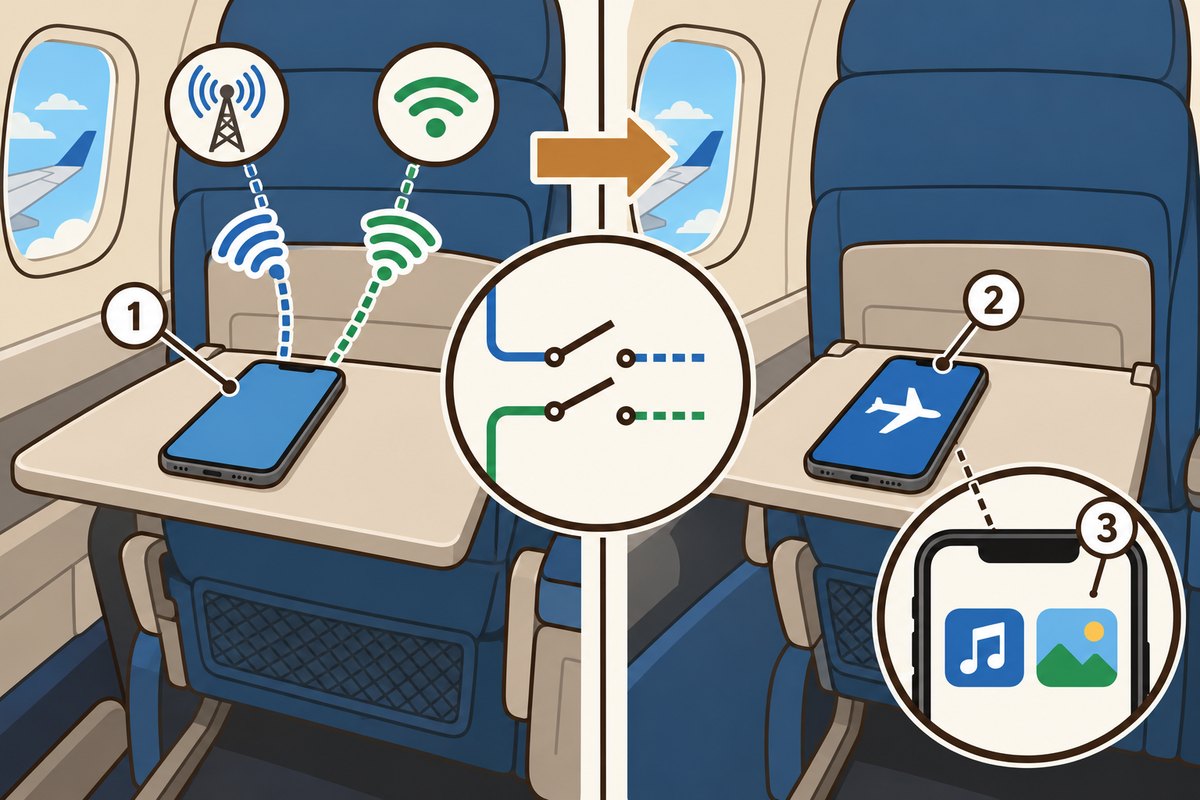
- 1Normally: the phone sends out cellular and Wi-Fi signals
- 2Airplane mode: signal-sending functions stop all at once
- 3Saved music and photos can still be used

The crew may still ask you to turn it off
EASA explains that with modern devices in airplane mode, the level of signals they give off is acceptable, and that almost all planes flying today are built to withstand strong interference. Even so, at certain times, such as a landing in poor visibility, the crew may ask passengers to turn off their devices. This is to make absolutely sure nothing affects the plane's communication and navigation equipment.
Rules differ by airline and country
How much you can use depends on the airline and the country. According to EASA, an airline may choose stricter rules, and airlines from outside Europe follow the rules of their own country. Services that use radio signals, such as onboard Wi-Fi, can be used only if the airline allows it and the plane is equipped for it. Most important of all is to follow the crew's instructions.
Want to know more?
- According to EASA, large items like laptops must be put away during taxiing, takeoff and landing, so no one gets hurt if the plane moves suddenly and so they do not block an evacuation.
- According to Apple, if the airline allows it, you can still use Wi-Fi and Bluetooth in airplane mode. If you turn off Bluetooth while in airplane mode, it stays off the next time you turn airplane mode on.
- A document from Japan's Ministry of Land, Infrastructure, Transport and Tourism says passengers need to be told that the conditions and types of devices allowed differ from plane to plane.
Quick quiz: test yourself
Remember what you just read? Give it a try!What happens to your phone in airplane mode?
Show the answer
- The power turns off
- Signal-sending features stop
- The screen gets darker
Signal-sending features stop Airplane mode switches off, all at once, the features that communicate by sending radio signals, such as the cellular connection and Wi-Fi.
Airplane mode switches off, all at once, the features that communicate by sending radio signals, such as the cellular connection and Wi-Fi.
Next quiz ›Sources
- Portable Electronic Devices – Frequently Asked QuestionsEuropean Union Aviation Safety Agency(欧州航空安全機関、EASA)
- Use Airplane Mode on your iPhone, iPad, Apple Watch, and Apple Vision ProApple Support(アップル)
- 航空機内における電子機器使用に関する規制緩和の方向性について(第2回 航空機内における電子機器使用に関する意見交換会)国土交通省 航空局 (in Japanese)
This article was written after checking the sources above as of 2026-10-03. Explanations may change as research progresses. Photo credits are shown below each photo.
Next fun fact ▶
 TechnologyHow does a phone recognize your face?Just look at your phone and the lock slides open. What exactly is it looking at?

40 surprising animal facts with big photos and short, easy text. A fun-facts book for kids and grown-ups to read together.
See it on Amazon