How are spam emails spotted?

 Many clues are looked at together to make the decision.
Spam is spotted by combining machine learning, which looks at many clues in each email together, such as its text and information about the sender, with fixed rules. "Sender authentication," which checks that the sender is genuine, and the results of users pressing "Report spam" are also used as clues.

Looking at thousands of clues together
According to Gmail, each email has thousands of possible clues (signals). Even if an email has a few features common in spam, that alone doesn't make it spam. Machine learning looks at many clues together to decide. It can find patterns in huge amounts of data that the people writing rules might miss, and it can quickly adapt as spam tricks keep changing. It is used together with rule-based protections.
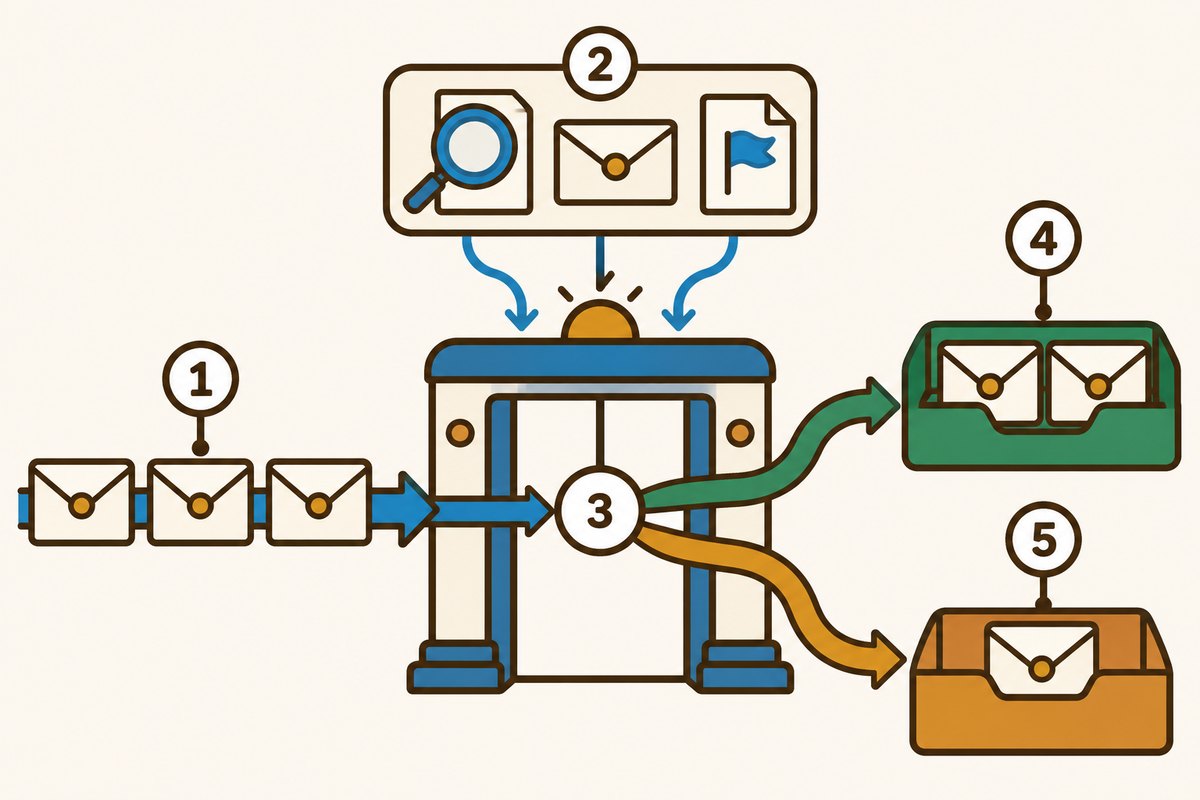
- 1Incoming emails
- 2Clues such as the wording, sender checks and user reports
- 3Where all the clues are weighed together
- 4Normal emails go to the inbox
- 5Spam goes to a separate box
Checking that the sender is genuine
The sender is checked, too. SPF is a system that sets which servers are allowed to send mail from a domain (the part of an email address after the @). DKIM is a system in which the sender adds an electronic signature to an email that the receiver can check. In Gmail, if a message can't be checked, a "?" appears next to the sender's name. Still, an unchecked email isn't necessarily spam, and spammers can pass these checks too.
Spam is different for each person
One person's spam can be another person's important email, such as a newsletter or notices from an app. So Gmail tailors its protection to each user. The more you use "Report spam," the better it gets at spotting similar emails. If you move an email out of Spam that was put there by mistake, future emails from that sender won't go to Spam.

A battle of wits with spammers
Spammers keep trying new tricks as well. In a 2019 explanation, a new system made it possible to catch image-based emails and emails with hidden content, blocking about 100 million more spam emails a day. In 2023, a system that resists text mixed with look-alike or invisible characters was added, raising the spam detection rate by 38% and lowering the rate of normal emails mistaken for spam by 19.4%.
Want to know more?
- In 2019, Google said it blocks more than 99.9% of spam, phishing and emails carrying malware before they reach Gmail inboxes.
- Emails with an empty body and subject are sometimes sent to check whether an address is in use. If one looks suspicious, don't reply.
- Gmail shows a warning for addresses made to look like a sender you know, for example by using the number "0" in place of the letter "O." Hold off on replying or opening links until you can confirm it.
Quick quiz: test yourself
Remember what you just read? Give it a try!How is spam spotted?
Show the answer
- By one word in the subject
- By putting many clues together
- By a person reading each one
By putting many clues together Each email has thousands of clues, and machine learning looks at them together, combined with rules, to decide.
Each email has thousands of clues, and machine learning looks at them together, combined with rules, to decide.
Next quiz ›Sources
- Spam does not bring us joy—ridding Gmail of 100 million more spam messages with TensorFlowGoogle Workspace Blog
- Check if your Gmail message is authenticatedGmail Help
- Report spam in GmailGmail Help
- Improving Text Classification Resilience and Efficiency with RETVecGoogle Online Security Blog
This article was written after checking the sources above as of 2026-10-03. Explanations may change as research progresses. Photo credits are shown below each photo.
Next fun fact ▶
 TechnologyWhy is a longer password a stronger password?A short password full of symbols, or a long one: which do you think is stronger?

40 surprising animal facts with big photos and short, easy text. A fun-facts book for kids and grown-ups to read together.
See it on Amazon